
Content Inconsistencies on the Digital Shelf: A Guide to Auditing and Standardising your Product Pages
TL;DR
Product content varies between retailers more than it seems, and these inconsistencies directly affect search, conversion, and returns. This article explains how to detect them with concrete signs and how to build a process for standardising pages on the Digital Shelf, from the source of truth to continuous monitoring across channels.
A brand with a presence in fifteen or twenty retailers lives with fifteen or twenty versions of itself. Each channel receives content differently, edits it in its own way, and publishes it according to its own rules. The result, almost always invisible until someone measures it, is a fragmented catalogue that confuses the shopper and penalises the brand in the search algorithm.

This guide explains what a content inconsistency on the Digital Shelf is, how to detect it with concrete signs, and how to build a product page standardisation process that works across multiple retailers.
What is Inconsistent Product Content on the Digital Shelf?
Inconsistent product content on the Digital Shelf occurs when the attributes of the same item vary between different digital points of sale. A product showing dimensions of 30cm on Amazon might appear as 35cm on Walmart, while showing 32cm on Google Shopping. These inconsistencies are not just an aesthetic problem. They directly affect the product’s ability to be found, compared, and purchased. When an internal search algorithm cannot read a misspelt attribute, the product loses its position. If an image does not faithfully represent the item, returns increase. And when content varies between retailers, the brand conveys a sense of lack of control that erodes shopper trust.
Google Merchant Center states that high-quality content must be accurate, complete, and uniform across all channels. Amazon requires technical attributes to match the product’s actual specifications to avoid automatic rejections. The problem often goes unnoticed because supervision of the Digital Shelf falls into a “no-man’s land” within many organisations. Marketing creates content, sales distributes it, and IT manages data, but no one oversees the final presence at each retailer. Manually reviewing 2,000 references across 15 channels is impossible, causing inconsistencies to remain uncorrected for months or years.
The Most Common Types of Inconsistencies and How to Detect Them
Not all inconsistencies manifest in the same way or have the same impact. It is useful to learn to recognise the signs that reveal a content problem before it translates into lost sales.
Sign 1: Incomplete or unappealing page
Generic two-line descriptions, empty bullets, or uncompleted sections are the most basic form of inconsistency.
How to detect it:
- Check if each page has a title, description, images, attributes, bullets, and technical data.
- Verify if the retailer’s mandatory fields are complete.
- Identify products without rich content when the category allows for it.
- Compare the page with the main competitors on the same results page.
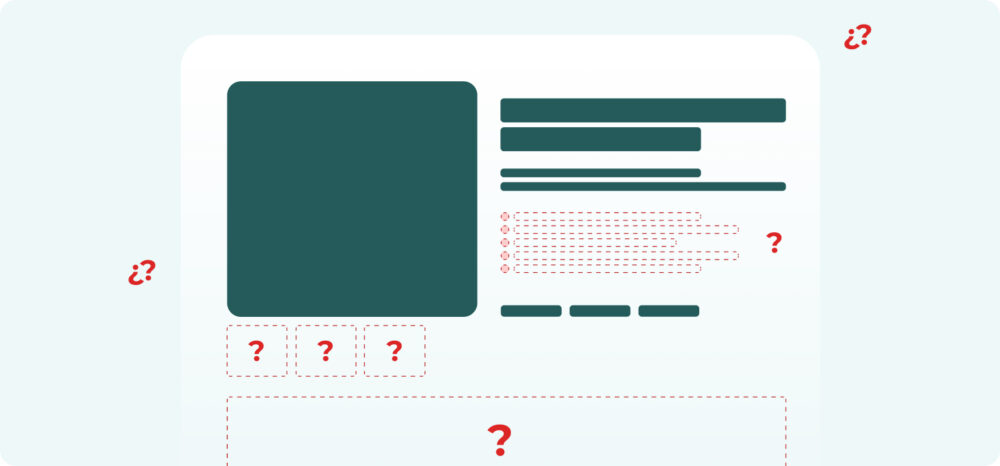
A product data audit should consider completeness, accuracy, validity, and consistency. GS1 Colombia recommends checking if the description answers essential questions: what the product is, what it is for, what it contains, and how it is used. A page that does not resolve these questions will not convert, even if the product is excellent.
Sign 2: Unoptimised attributes
Attributes are structured fields that help the retailer classify, filter, and display the product. When attributes are poorly defined, the product can be left out of relevant filters. If a consumer filters by “gluten-free”, “size M”, or “stainless steel”, a listing without that attribute will lose visibility even if the product meets the condition.
The most frequent inconsistencies are:
- Values written in different ways: “500ml”, “500 ml”, “0.5 L”.
- Attributes in incorrect fields.
- Abbreviations not recognised by the retailer.
- Contradictory data between the title, description, and technical information.
- Absence of key attributes for filters and facets.
- Poor translations or adaptations.
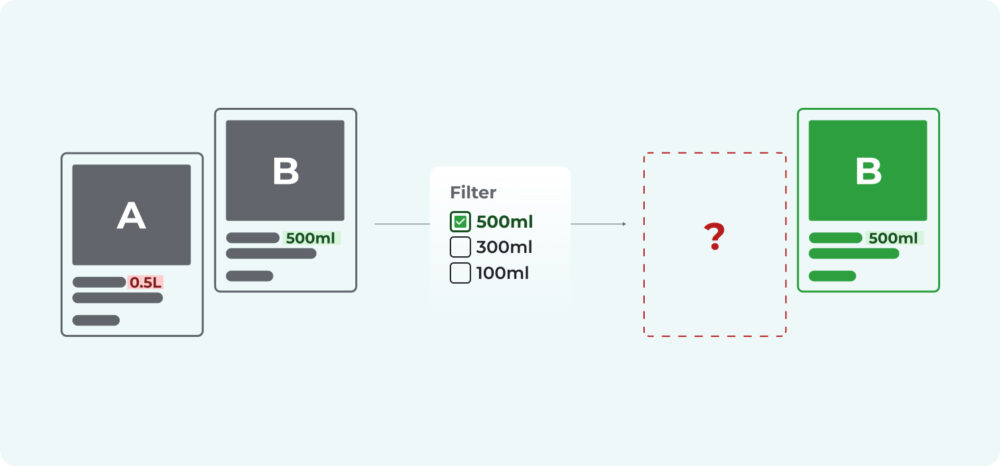
A poorly standardised attribute removes the product from the filters where the shopper was looking for it.
Artificial intelligence can help detect anomalous patterns, duplicate values, or inconsistencies between similar products. For example, if all products in a line have the “paraben-free” attribute except for one, the system can flag it for review. This type of control reduces manual errors and speeds up catalogue standardisation.
Sign 3: Degraded positioning in internal search
When the title, category, or attributes do not match the vocabulary used by shoppers within each retailer’s search engine, the product loses organic visibility in that specific channel.
A drop in internal ranking may be due to:
- Titles without primary keywords.
- Generic descriptions.
- Incomplete attributes.
- Low availability.
- Uncompetitive price.
- Lack of reviews or low rating.
- Content not aligned with search intent.
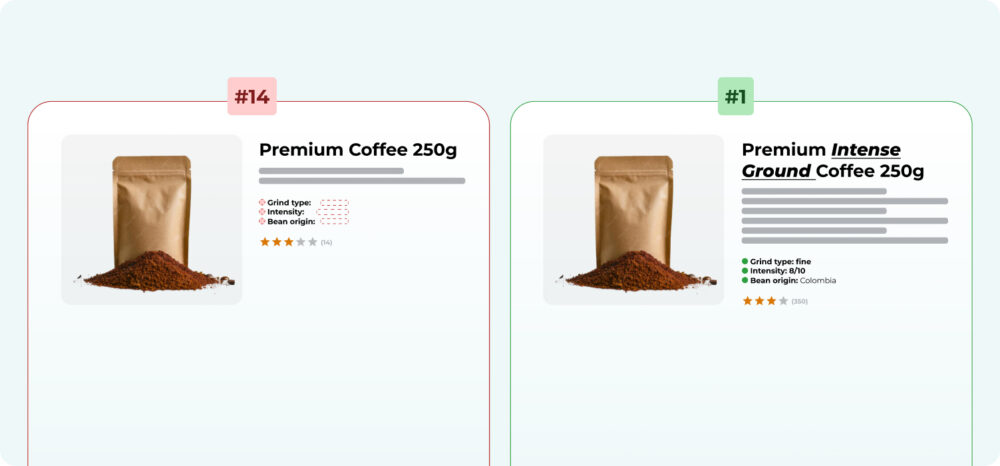
Detecting degraded positioning requires monitoring important keywords for the category. For example, a coffee brand should review terms like “ground coffee”, “coffee beans”, “decaffeinated coffee”, or “coffee pods”. If a relevant product does not appear or drops positions, the page must be analysed along with price, stock, ratings, and content.
Sign 4: Unrepresentative photos that lead to returns
Blurry images, images with an unsuitable background, or those that do not show the product from multiple angles generate distrust at the point of purchase and false expectations after it.
The most common visual problems are:
- Old packaging.
- Lack of secondary photographs.
- Absence of zoom or detail.
- Images that do not show scale, texture, or use.
- Differences between the photo and the delivered product.
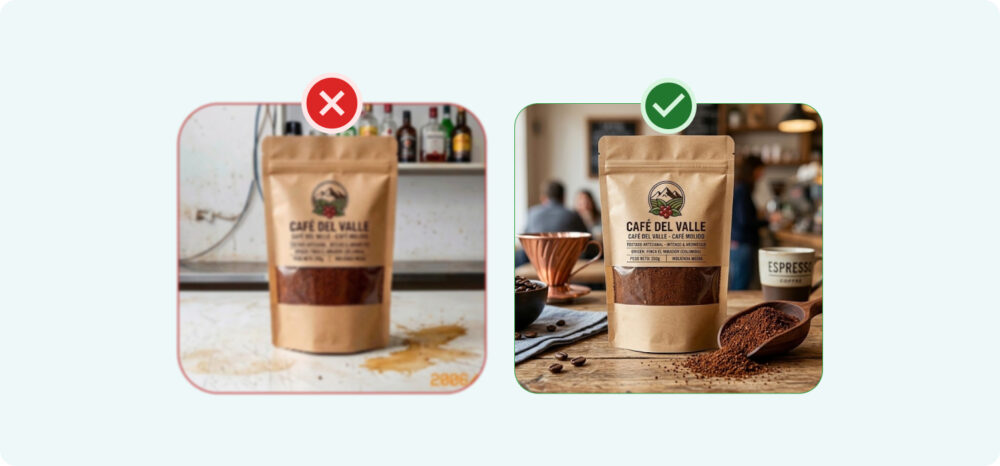
The occurrence of these problems is directly linked to higher return rates.
To audit images, it is useful to compare the published photo with the official asset approved by the brand. It is also helpful to check resolution, background, orientation, number of images, publication order, and adaptation to the standards of each channel.
Sign 5: Undetected inconsistencies across multiple retailers
The most dangerous sign is the one no one sees. Risk increases when each retailer has its own format, taxonomy, maximum field length, image rules, and upload system. The same product may appear with variations in name, description, category, or attributes depending on the channel.
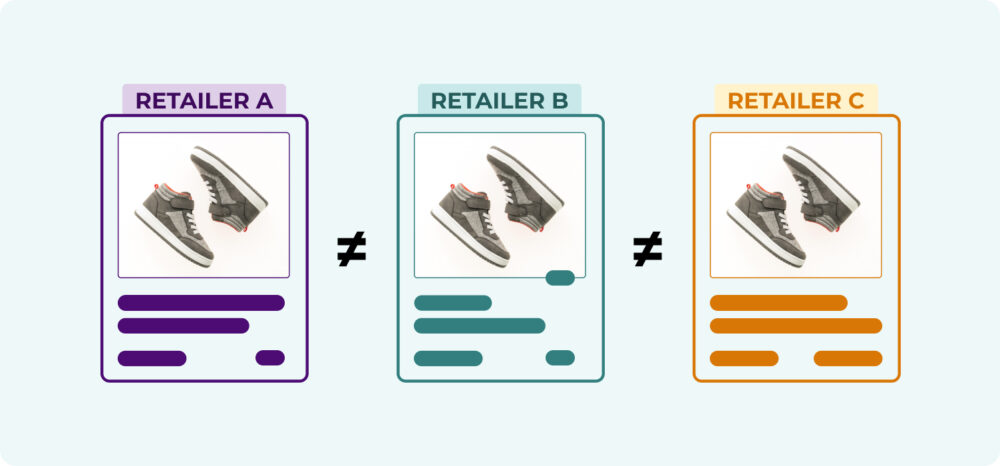
Multi-retailer inconsistencies are detected by comparing the published information with a source of truth. Digital Shelf Intelligence platforms allow for tracking product pages, capturing visible content, identifying changes, and generating alerts when a field deviates from the standard.
What Elements Should a Standardised Product Page Include
Before building a standardisation process, it is useful to establish which fields make up a complete page. A standardised product page should combine commercial, technical, visual, and regulatory information. The exact structure depends on the category, but there are common elements that every brand should control:
- Unique identifier: GTIN, EAN, SKU, or internal code.
- Brand and sub-brand: written uniformly.
- Optimised title: including brand, product type, main attribute, format, and quantity.
- Short description: clear, benefit-orientated, and aligned with search intent.
- Long description: including features, uses, advantages, instructions, and relevant details.
- Structured attributes: size, weight, colour, flavour, material, capacity, compatibility, certifications.
- Category and subcategory: according to the retailer’s taxonomy.
- Official images: primary, secondary, lifestyle, detail, packaging, and explanatory content.
- Legal or regulatory information: ingredients, allergens, warnings, country of origin, storage instructions.
- Logistical data: dimensions, gross weight, units per case, type of packaging.
- Rich content: videos, comparisons, A+ modules, FAQs, or user guides.
- Strategic Keywords: naturally integrated into the title, bullets, description, and attributes.
Standardisation does not mean publishing exactly the same text across all retailers. It means maintaining consistency in essential information and adapting content to the rules, formats, and opportunities of each channel.
How to Create a Product Page Standardisation Process across Retailers
Once inconsistencies have been identified and the minimum elements of a page defined, the next step is to build a repeatable process that keeps content aligned over time, not just at the moment of the initial audit.
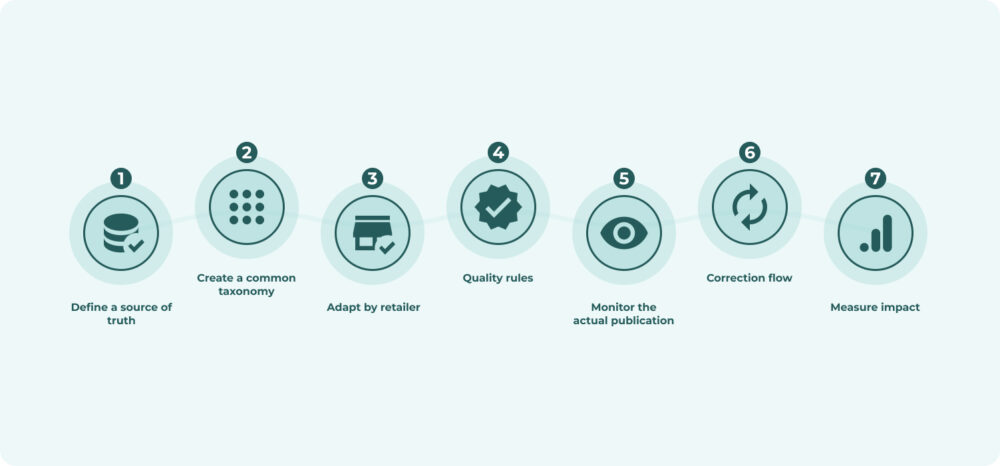
Step 1. Define a source of truth
The first step is to establish master content from which all versions published in each channel are derived. It is also necessary to decide where the official product information lives. This could be a PIM, MDM, ERP, DAM, or a centralised database. This source must contain data approved by marketing, trade, e-commerce, legal, quality, and supply chain.
It should be clear which team can modify each field, how changes are approved, and which version is current. Without a source of truth, each team generates its own version of the product, corrections become reactive, and each retailer ends up using different information.
Step 2. Create a common attribute taxonomy
A common taxonomy allows for the sorting of products, categories, and attributes with consistent criteria. It should include field names, definitions, accepted units, permitted values, and equivalencies.
A shared attribute dictionary, with accepted units, synonyms, and resolved equivalencies, prevents each supplier or market from introducing variations. This foundation also facilitates automation and reduces errors in bulk uploads.
Step 3. Adapt content to each retailer’s requirements
The source of truth is not published in the same way across all channels. Each retailer imposes its own character limits, image formats, and mandatory fields.
It is useful to create templates by retailer including:
- Maximum title length.
- Mandatory fields.
- Image rules.
- Permitted categories.
- Priority attributes.
- Relevant keywords.
- Legal or technical requirements.
Adapting master content to these rules, without losing the consistency of the core message, is what distinguishes a legitimate adaptation from an uncontrolled deviation.
Step 4. Establish quality rules
Defining minimum thresholds (image resolution, description length, mandatory attributes by category) allows for an objective evaluation of whether a page meets the standard before it is published, rather than discovering it afterwards.
These rules can be applied manually, with validations in the PIM, or through artificial intelligence to detect semantic anomalies.
Step 5. Monitor actual publication
Sending correct content to the retailer does not guarantee that it will be published correctly. There may be upload errors, internal modifications, mixing with old content, changes made by sellers, or missing fields.
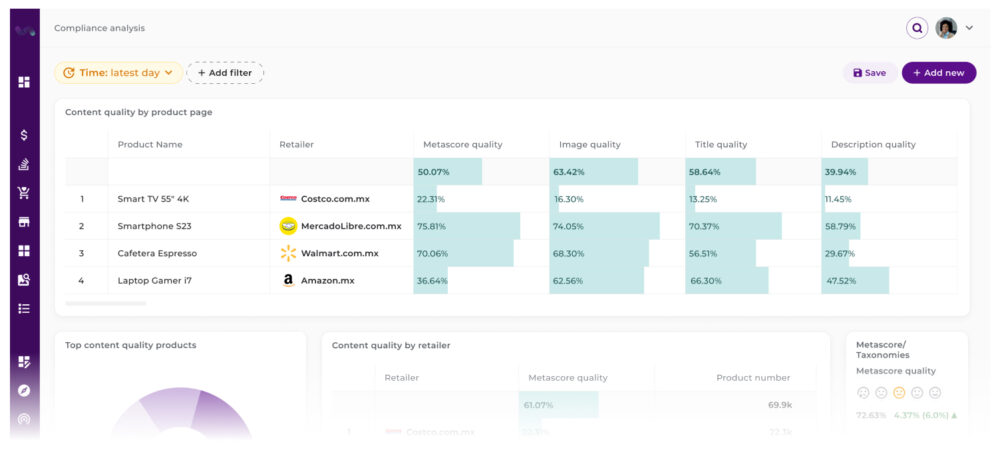
Therefore, it is necessary to monitor actual product pages. The audit must compare what is published against the official source and generate alerts for relevant differences. The most useful indicators are page completeness, attribute accuracy, visual quality, search position, first-page presence, and competitor content.
Step 6. Activate a correction flow
Detecting a deviation has limited value if there is no clear path to resolve it: who receives the alert, who approves the change, and in what timeframe it is corrected. This flow must be defined before the first problem appears, not improvised once it has already affected sales.
Step 7. Measure impact
Closing the process with business metrics (variation in conversion, search visibility, or return rate following each correction) allows for justifying investment in content governance and prioritising which categories or retailers need more attention.
Conclusion: the product page is a commercial asset, not a formality
Every field on a product page has a direct effect on whether that product appears in a search, whether it builds shopper trust, and whether it ends up in the basket or as a return. Treating the page as a formality that is completed once and forgotten is what allows inconsistencies to accumulate unchecked for months.
Detecting these problems manually, retailer by retailer, is a task that rarely scales for a multi-channel catalogue. Systematically auditing, defining a common source of truth, and monitoring what is actually published on each channel is what turns content management into real governance, rather than a one-off exercise repeated every time a problem arises.
Digital Shelf Intelligence platforms like Flipflow’s address exactly this need: they audit product page content and detect inconsistencies, gaps, and opportunities relative to the brand standard and the competition, ensuring that digital presence remains aligned across all retailers on a continuous basis.